
Do you love to write? I do. So much so that I said goodbye to a prestigious contract teaching position at one of Canada’s two largest colleges. I had been writing content for clients, on and off, but two things kept on pushing themselves the surface of my mind:
- I was done, overdone; in fact baked, in terms of college teaching.
- I had wanted for years to focus on writing.
I stepped away from college teaching, after a quarter century, and focused on my business.
Like many of you, I try to jot down notes somewhere (usually in an app in my phone) about my next article, book, post, or other writing job. Over the years, I’d found I couldn’t write properly on my phone. I have the apps, and what I think is the best app for novelists, yWriter, but aside from small edits, I wasn’t comfortable with doing any serious creating there. But this post is being created on my tablet, and my tablet is my go-to piece of technology I often have with me on the go. The picture below, minus the apps I’m using – I’ll list those later – shows you my very portable toolkit.
Affiliate links: Some of the links in this post are affiliate links. That means that if you click such a link and/or decide to buy something, I may get a small commission. You are never obligated to buy anything.
Tablet ‘Real Estate’ and Functionality
I used to lug a laptop or notebook computer around with me. The newer they got, the lighter they got. But still, with books, water bottle, knickknacks and so on, my backpack was a back breaker. My smallest laptop, something I’ve continued to invest money in for various upgrades, is a Dell with a 14″ screen. It does have some weight to it. As I explored the world of Android over the past few years, I discovered just about every app I needed in terms of productivity has become available. In fact, I often prefer an Android app over its Windows big sister. I drafted this blog post on my tablet using Automattic’s WordPress app.
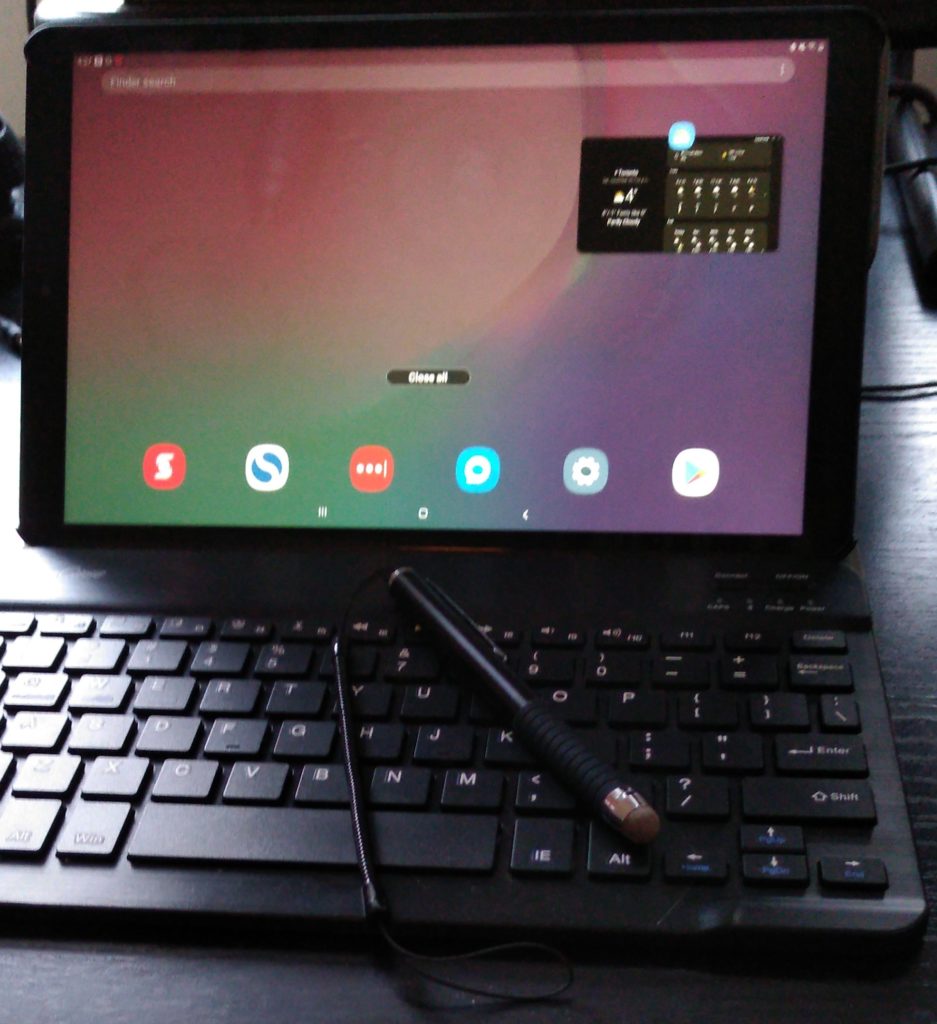
Many tablets, like the Samsung’s Galaxy Tab A I purchased, have a great screen with high resolution (1200 x 1920), plenty of power, and of course access to almost 3 million apps. Some tablets may/may not run an app at all, or may not offer exactly the same interface as its Windows counterpart, my tablet has everything I need for a portable office. The 10.1″ screen isn’t really that much smaller than my Dell’s screen. They call this tablet mid-range. I find it offers me a full range of what I need.
So whether screen size, resolution, power, battery life (which is great on this machine), or functionality, a fully-equipped tablet is a heck of a lot easier to ‘lug’ around. Let’s get to the peripherals.
Bluetooth Keyboards
The screen keyboards on tablets never worked well for me. For messaging apps, drawing, watching movies, listening to music and so forth; sure. But for anything other than a few words or so, I knew I needed a keyboard. I shopped around, and in their early days, landed one or two acceptable Bluetooth keyboards. They were clunky, and at times hard to use. And touch typists, you’ll know what I mean when I say the tactile feedback you get from a decent keyboard (controlled by the the type of key switch mechanisms used in the keyboard) just wasn’t there.
As things improved, I moved to a Battop Wireless Bluetooth Keyboard. I still have it, and I really like it. One of its pros (also one of its cons for some people) is that it’s as wide as a small laptop’s keyboard; not as deep, however. No problems pairing it to both tablet and phone. Nice springy touch. And it’s slightly elevated to make typing more natural.
Note: the link for the keyboard above is for an older model, no longer available.
As newer keyboards hit the market, I decided to get one that was more closely created or ‘paired’ to my new tablet(s): paired, meaning about the same size, very lightweight, and guaranteed for specific table makes and models. The tablet and keyboard easily fit into the same protective case, as you can see in the above picture. I ended up most recently purchasing a ProCase keyboard/combination for my tablet. It came with case and keyboard.
These keyboards have generally good to great reviews, and there are models for both Android and Apple products. Very functional, very light as mentioned, easy to pair, and a joy to use. They don’t seem to draw much battery power, and there’s no conflict in terms of using the keyboard with, say, Bluetooth headphones.
Tablet Stylus’
I resisted getting a stylus/pen for quite some time. After a time, especially in apps with smaller icons, or where a little more accuracy was needed, I decided I needed something. I purchased two tablet stylus’; the first, a mouthful to say, was a Ciscle Capacitive Touch Screen Tablet Stylus! You can see it pictured above. It may look ‘clunky’, but it works well for me, and claims to work on most devices and brands. See my note below about the important differences between capacitive and inductive stylus’.
The second capacitive stylus I purchases is designed more for drawing and writing.
Note: it’s very important you know about your tablet’s screen before purchasing a stylus/pointer/pen. Many tablets have have special integrated hard- and software technology that allows you to use an S Pen (this is the name Samsung gives to their device, but they are also known by other names). You may want to read this article from Android Central to understand the difference between an ‘after-market’ stylus (the one I have shown in the picture above), which is a “capacitive input device” (like your finger), and an S Pen, which is an inductive input device that relies on a special digitizer under the tablet’s glass screen.
I am no expert here, but everything I’ve read says inductive input devices are a lot more accurate, and draw less power than capacitive input devices.
Protective Case/Stand
As mentioned above, I ordered my tablet keyboard and case together.
The case is large enough to hold both tablet and keyboard. It has a magnetic lid/clasp, is durable, and acts as a tablet stand in landscape mode, allowing for various angles of viewing. It fits the tablet perfectly. It offers great screen protection, though it sometimes leaves traces of the imprints from the inside; not a problem, and easily wiped away.
Writing on the Go?
Whether I write or do edits on my latest novel, using yWriter, draft a blog post like this one using the WordPress app, or open up one of Office Mobile’s suite, my tablet and I are inseparable!
Need a little writing advice or counsel right now? Your first consultation is always f-r-e-e. Please fill out the form below, and click Send. I will get back to you within 24 hours during weekdays.



Recent Comments